



There are 10 tech stories in today’s Substack issue of The Shortcut


I got to meet Tim Cook and Joz today
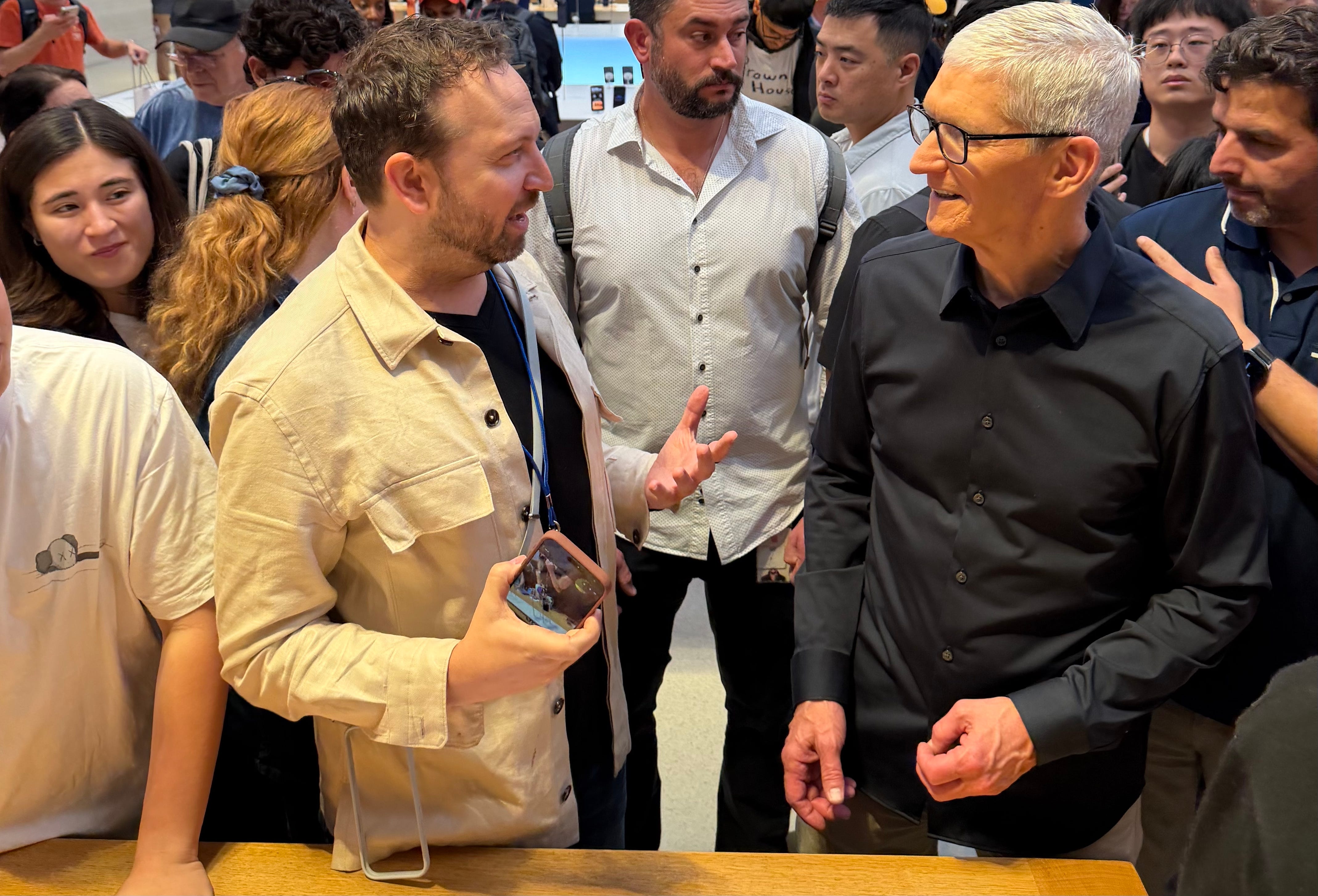
iPhone launch day is always a rush – and The Shortcut team is all over the coverage on our Substack. Today’s Cover Photo, taken by our own Kevin Lee, captures the moment Tim Cook sold one of the first iPhone 17 Pro Max at the Apple Store 5th Avenue in NYC. Of course, the phone that was triumphantly held up was in that bold, new orange color.


I got time with the busy Apple CEO to snap a quick selfie using the fresh 18MP Center Stage camera available on all of the new iPhones. The upgraded front camera allows you to switch between portrait and landscape orientations (either manually or automatically if it detects more people) without having to twist the phone. No more turning your wrist awkwardly to capture that wide group shot. Brilliant. 🤳
Photos from across the table were kindly taken and AirDropped to me by Michael Josh of GadgetMatch. Go subscribe to him on YouTube!
My iPhone Feature Request

I think Apple is on to something with Center Stage, and I’d love to see it go further by using “Open Gate” (a term for recording video using a full camera sensor, like 3:2 or 4:3), then Apple Intelligence to reframe a video for both 16:9 and 9:16. That would be a creator’s dream (and a killer app for Apple Intelligence). No one has done it yet on a smartphone.
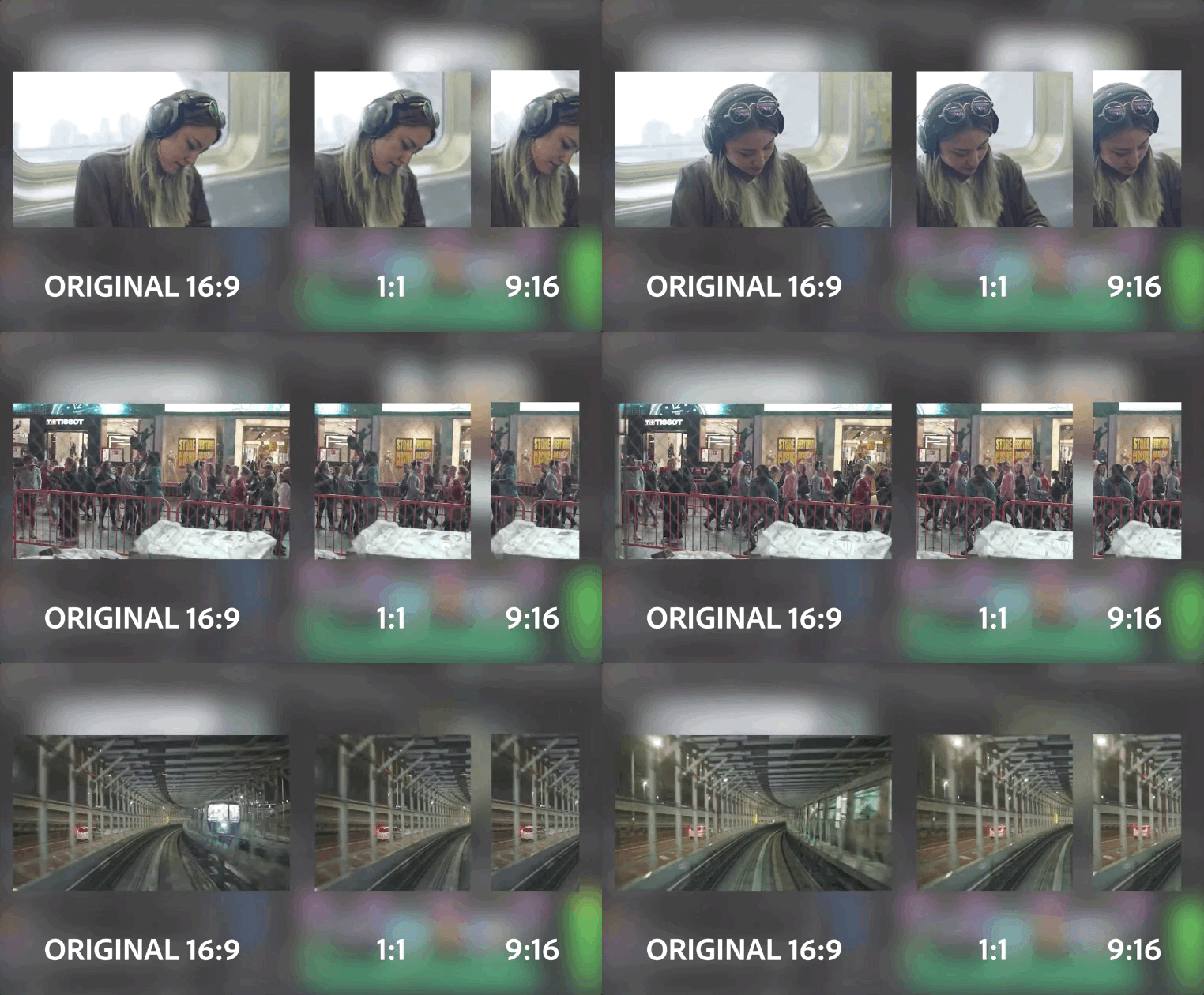
Only a few cameras – GoPro and Lumix – shoot “Open Gate” video, and Adobe Premiere Pro has a handy AI Reframe tool. But on any phone, I still need to record twice: once for YouTube (16:9) and once for IG/TikTok (9:16). For unboxings or sports, there’s no second take. I’d love to see the iPhone have a mode where I could record once with guidelines and any in-between aspect ratio, then leave it to Apple Intelligence to reframe the video.
I’m putting this idea in Tim’s iOS 26 Priority Inbox. 🤞
iPhone 17 Pro vs iPhone 1 with Joz
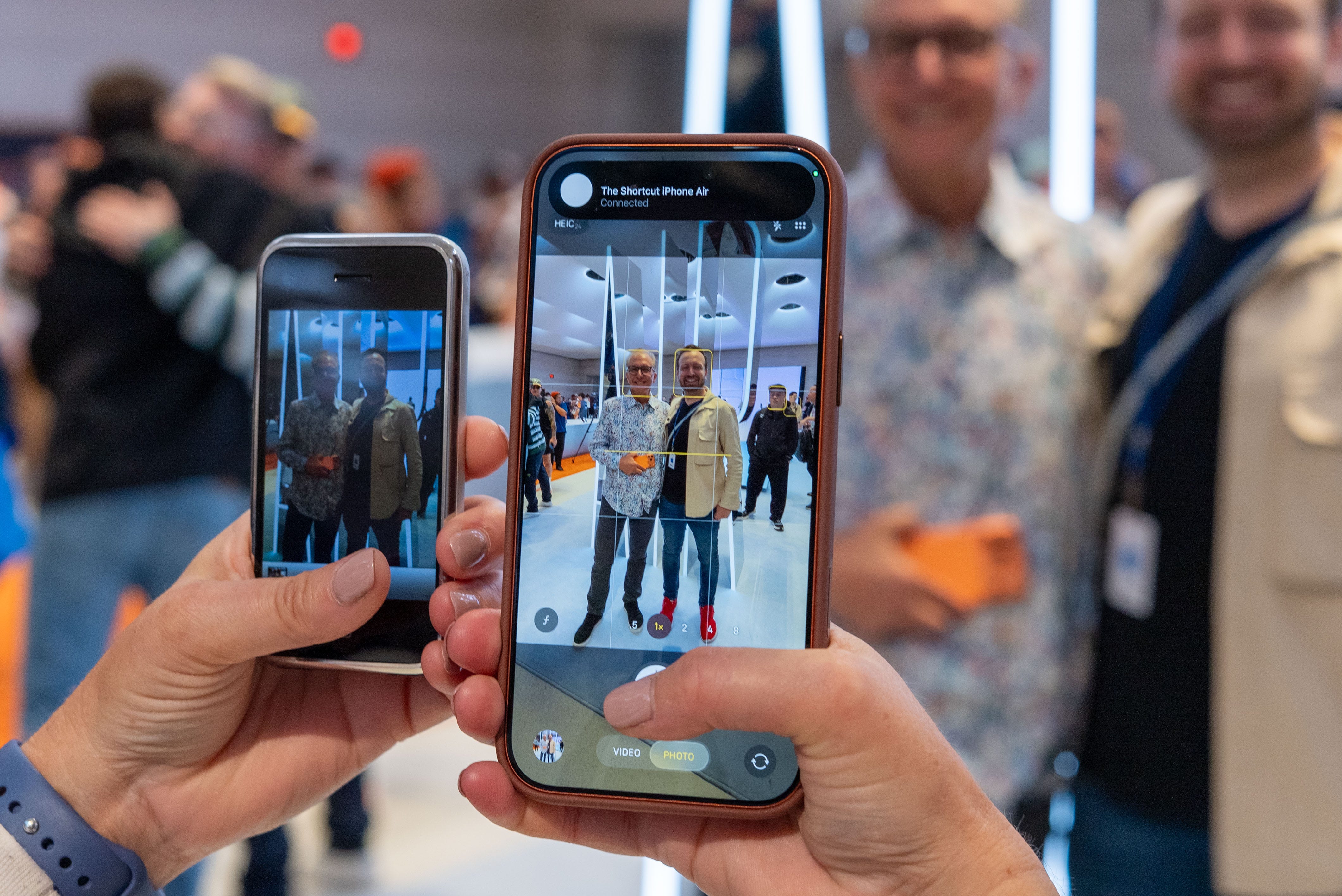
iPhone launch day is also my big chance to snap a photo with Apple’s SVP of Marketing Greg “Joz” Joswiak – always with the very latest iPhone I’m testing and my original iPhone 1 to compare. It’s now a tradition, and Joz is not only a great sport about it, but he loves seeing my still-in-good-condition iPhone 1, technology he helped launch 16 years ago.
It’s amazing to witness the growing differences between the photos every year – and the display clarity and brightness (see that telling photo above). This idea comes from an iPhone 1 vs iPhone 7 article I wrote for TechRadar nearly a decade ago.


This photo comparison is going into my forthcoming iPhone 17 Pro Max review (I just got the phone on Wednesday, and I prefer to do a week of testing, so check back next week). Prior side-by-side photos are in my iPhone 16 Pro review and my iPhone 15 Pro review. Stay tuned!
🚀 1. Our iPhone 17 launch day guide

🎵 We already reviewed the AirPods Pro 3 in full
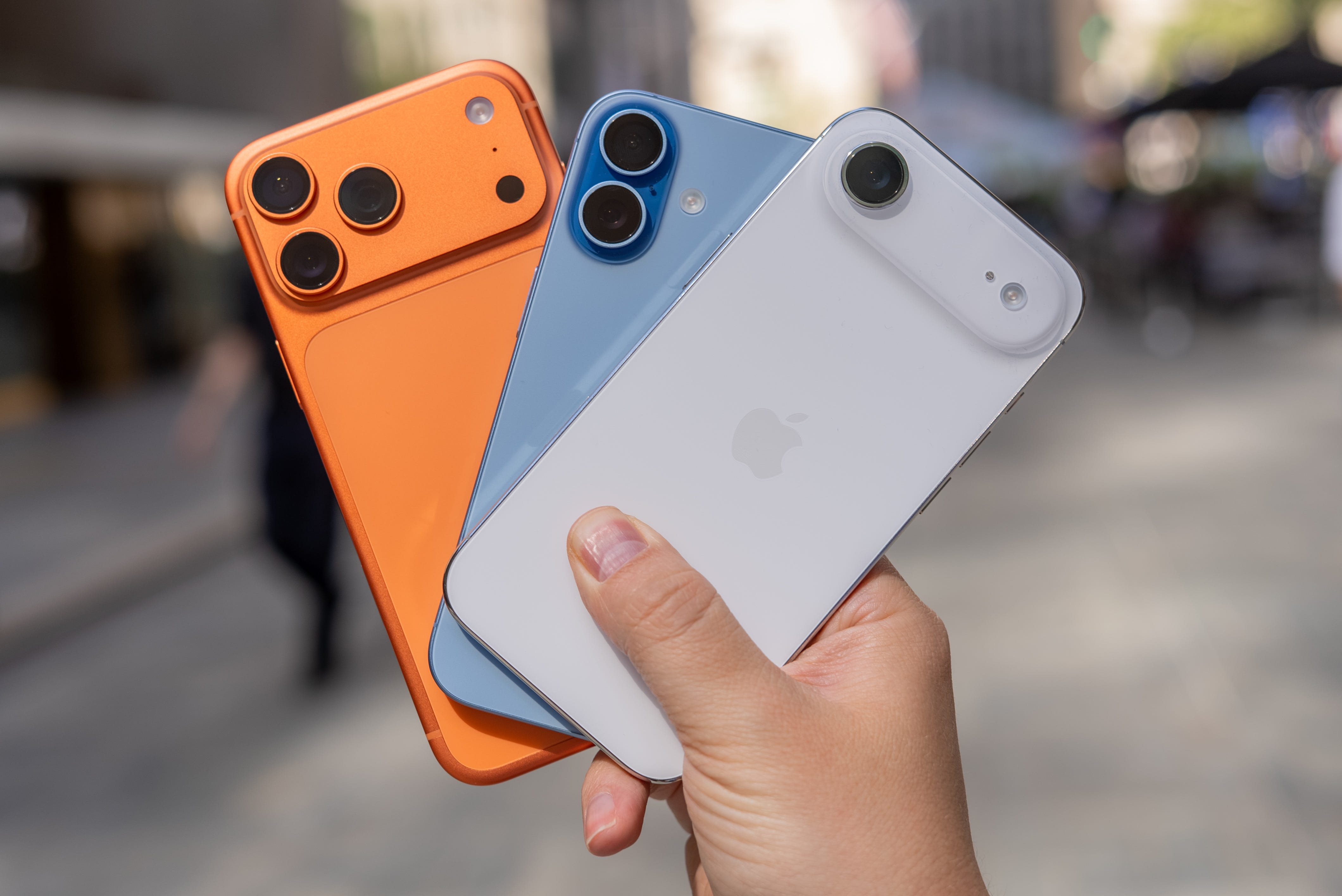
🌈 See all of the iPhone 17 Pro colors & iPhone Air colors (new photos from today)
🪞 The best iPhone 17 Pro screen protectors we could find
🔌 The best iPhone 17 Pro chargers to stay juiced up
🎮 The new iOS 26 Apple Games app explored
📱 How to install iOS 26 step by step
🧳 The best iPhone Air cases and iPhone 17 Pro cases
We’re still working on next week’s iPhone Air review, iPhone 17 Pro Max review, and Apple Watch Series 11 review. But we’ve linked to our media friends who have had more time with the phones. Our AirPods Pro 3 review is already up, and it’s spectacular.
Have burning iPhone questions? Join our Substack Chat for 1:1 tech advice for paid subscribers.
💼 2. Best Nintendo Switch 2 cases: protect and power up your console

💰 Switch 2 is large and expensive, making a protective case essential
🧳 Cases offer various features, including enhanced ergonomics, power banks for extended battery life, and dock compatibility
🥇 Popular options include the dbrand Killswitch for comfort and docking, the Belkin Charging Case for extra power, and the JSAUX Split Protective Case for dock compatibility without an adapter
👏 Other notable cases are the slim and durable TomToc Fancy Case and the official Nintendo Carrying Case, which includes a screen protector
The Switch 2 is the most expensive console Nintendo has ever made, so you’ll want to ensure it’s protected whenever you take it on the move. The larger screen and different dimensions mean your old Switch case won’t work with the Nintendo Switch 2. But luckily, there are some fantastic options that do more than just help transport your console safely.
We’ve rounded up five of the best Nintendo Switch cases right now, each offering something a little different.
😎 3. Meta Ray-Ban Display costs $799, out September 30
👀 Built-in Display: The new Meta Ray-Ban Display smart glasses feature a private, in-lens display for messages and navigation
😮 Wristband Control: Users control the glasses with an EMG wristband, allowing for discreet gesture-based responses and media control
💰 Price and Release: Priced at $799, the glasses are set for release on September 30, 2025, targeting a premium market
🤖 AI and Other Features: They include Meta AI for analysis and instructions, Transitions lenses, hands-free video calling, recording, translation, and live captioning
Meta has officially unveiled its new Ray-Ban Display smart glasses, and they’re impressive. The Meta Ray-Ban Display contains a private, in-lens display, which can be controlled using an EMG wristband. You can see messages, get on-foot navigation and more, and discreetly respond and reply using simple gestures.
Priced at $799, the glasses are set for release on September 30, 2025, targeting a premium market. They join the Ray-Ban Gen 2 smart glasses (now $349, up from $299 from the previous version), and the new Oakley Meta Vanguard glasses cost $499.
🎧 4. Astro A20 X review: two gaming headsets in one for $179

🏆 Rating: 4.5/5
🏅 Editor’s Choice Award
✅ Pros
💵 Excellent $179 price for essentially two gaming headsets in one
👥 Two USB-C connections for Xbox, PS5, Nintendo Switch 2, and PCs
🎮 Xbox-compatible for no extra cost or separate colorway
🔊 40mm drivers deliver highly customizable sound and great spatial audio
🎙️ Higher-bandwidth microphone and tunable voice capture
❌ Cons
📢 Practically no sound isolation from outside noises
🎚️ Drivers aren’t very powerful below 50% volume
Astro has been on a roll with its multi-system connecting headsets, but not everyone has $300-400 to spend on a gaming headset. That’s where the $179 Astro A20 X comes in.
It only supports two consoles, unlike three devices with the Astro A50 Gen 5 or Astro A50 X, but that still solves the big headache of needing a second gaming headset for your PS5 Pro, Xbox Series X, Nintendo Switch 2, or PC. Check out our full review.
↕️ 5. Uplift V3 Standing Desk launch: more stability, 3-stage telescoping legs
🖥️ Your powered workstation standing desk options just got better this week
🦵 Uplift V3 Standing Desks now have enhanced 3-stage telescoping legs
⬆️ Refactored height range now fits over 95% of the US population
🔌 FlexMount Cable Manager comes free with every V3 standing desk
🪛 1-tool frame assembly can be done in a fraction of the time of the V2 frame
📆 This is the first major Uplift Standing Desk redesign since V2 in 2019
I switched to a standing desk a decade ago and haven’t regretted it. The height versatility, even if you’re not standing at your workstation every day, is a major benefit for your posture. But I’ve been waiting to switch to market leader Uplift, and now is the perfect time.
In the coming weeks, I’ll be reviewing the newly launched Uplift V3 Standing Desk, the company’s first major redesign since the V2 in 2019. And yes, as outlined above, the extra stability means that I’ll be standing on this desk to test it out.
🎞️ 6. Adobe Premiere will come to iPhone and iPad this month

🚀 Adobe Premiere is launching on mobile as a new pro-quality video editor
📆 It releases on September 30 for iOS/iPadOS (you can pre-save it now)
🆓 No catch. It’s free, and there are no ads or watermarks upon export
🎞️ This is an alternative to mobile tools like TikTok-owned CapCut
🤖 Not on iOS? Adobe Premiere is currently in development for Android
Just like we experienced with real Photoshop coming to iPhone earlier this year, Adobe is launching a promising mobile version of Adobe Premiere, its flagship video editor. This goes beyond what the soon-to-be-phased-out Adobe Premiere Rush can do.
Back in January, when CapCut was banned (along with TikTok) in the US, I was hunting for a new multi-track timeline editor. Final Cut Pro on iPad is good, but it doesn’t work for iPhone and costs $4.99/mo or $50 a year. Adobe is launching Premier on iPhone and iPadOS for free (you only pay for Firefly AI credits and cloud storage – if you use them).
⚡️ 7. Pokémon Legends: Z-A pre-orders now live

🎮 Pokémon Legends: Z-A is the next big Switch 2 game
📆 It’s launching on October 2, 2025
🎉 Pre-orders are now open at various US retailers
💰 The game costs $59.99 on Switch 1 and $69.99 on Switch 2
You can now pre-order Pokémon Legends: Z-A for Nintendo Switch and Nintendo Switch 2. If you purchase the Nintendo Switch version, you can upgrade to the Switch 2 Edition for $9.99. The Nintendo Switch 2 Edition promises to deliver a higher frame rate and resolution.
The Pokémon Legends: Z-A Nintendo Switch 2 bundle is also available for $499.99. It includes a digital code for the game and saves you $10 as opposed to buying the game and console separately.
🎶 8. Nothing Ear (3) wireless earbuds are out now

👂 Nothing has just released its upcoming Ear (3) earbuds
🎤 New ‘Talk’ button on the case makes it easier to hear
🆚 Many will see them as an alternative to the AirPods Pro 3
💰 The Nothing Ear (3) costs $179.99
Nothing just released the latest edition of its wireless earbuds. They sport a familiar-looking design and Nothing’s signature translucent plastic design language. However, one big change is the new ‘Talk’ button on the case, which includes a microphone. It should provide superior mic quality to the earbuds, handy if you’re taking a call in a noisy environment.
The earbuds promise noise cancellation of up to 45 decibels and 5.5 hours of playback with ANC turned on. The Nothing Ear (3) also support LDAC and Hi-Res audio. You can get them now for $179.
🌍 9. Sonic Racing: Crossworlds review roundup: 'a thrilling, chaotic, and endlessly replayable racer'

👍 Sonic Racing: Crossworlds has a Metacritic score of 83 after 50 critic reviews
🤩 The game has 90% positive reviews, 10% mixed, and 0% negative
🚗 It’s the fourth entry in the Sonic Racing series
📆 The game is out on September 25 for consoles and PC
Reviews are in for Sonic Racing: Crossworlds, and it seems like a genuine alternative to Mario Kart World – with some critics even preferring it to Mario Kart World. The game currently sits at a Metacritic score of 83 after 50 critic reviews. That’s a couple of points short of Mario Kart World, which achieved a score of 86, but still a strong result for Sega.
📸 10. Nikon Z50 II review: beginner camera price, flagship speed
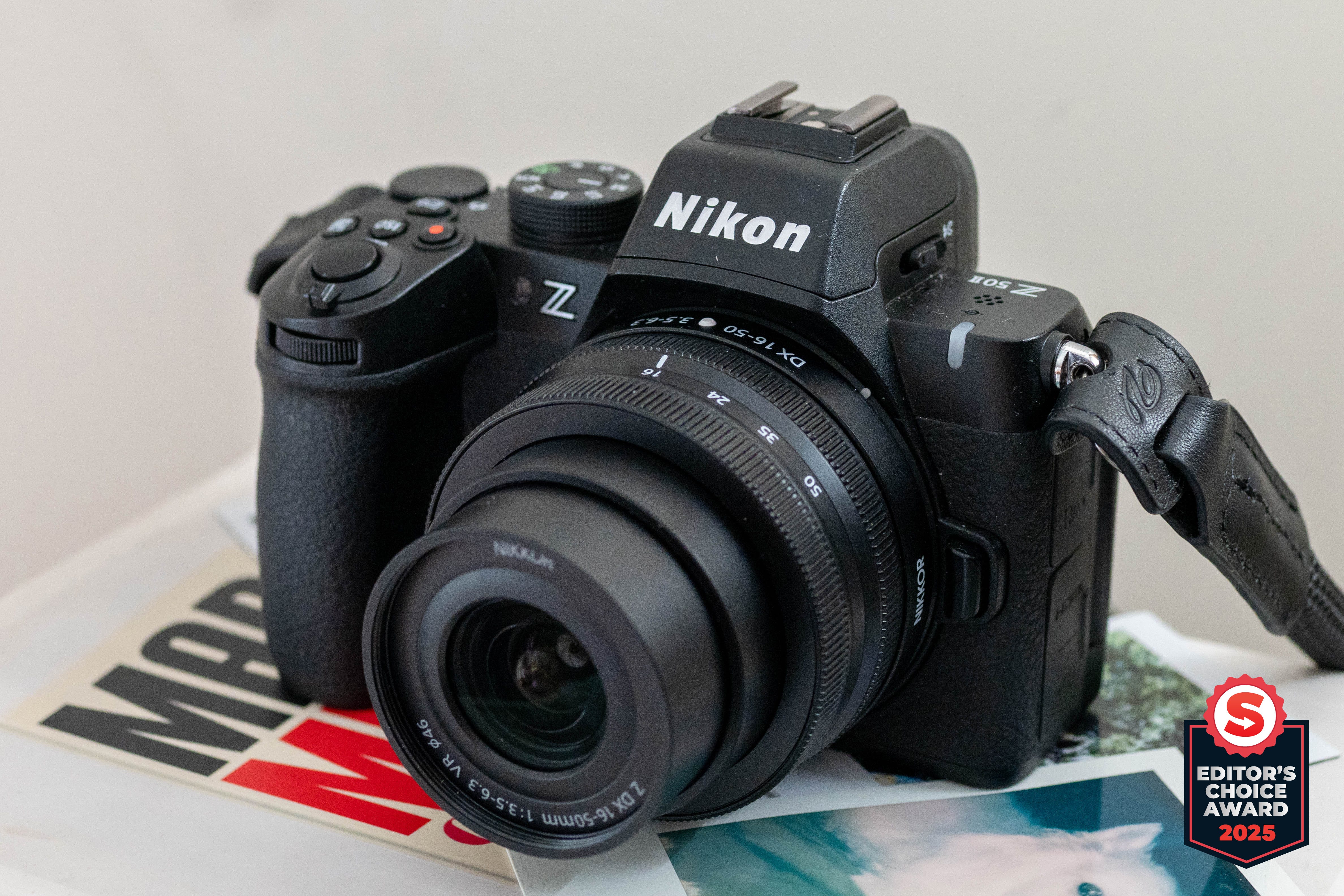
🏆 Rating: 4/5
🏅 Editor’s Choice Award

✅ Pros
📸 Captures photos with sharp detail and realistic colors
🎥 Record videos in flexible RAW and N-Log formats
⚙️ Flagship image processor speed and features
🤏 Incredibly pocketable, especially with collapsible lenses
👁️ Bright and large EVF
❌ Cons
🟰 Same 20.9MP sensor as its predecessor
🫨 No in-body image stabilization
▓ The rear screen is too dim to see in daylight
✂️ 4K 60p video shooting suffers a 1.4x crop penalty
The Nikon Z50 II is an impressive beginner camera. For starters, it's a $1,000 camera body that can shoot movies in 10-bit N-Log or RAW. It comes with the same image processor as Nikon’s flagship mirrorless camera, so you’ll get the same speed and full features as the higher-end Nikon Z6 III. The downsides of this camera are that it still features the same 20.9MP as its predecessor, still lacks in-body image stabilization, and the rear LCD screen is too dim.
If you don’t mind those two shortcomings, the Nikon Z50 II is a well-equipped camera for its price and is also super compact, making it ideal for everyday use.

⬆️ Tap the 🌟 icon button on this page ⬆️
🔒 Bonus: $100 PS, $50 Nintendo & Xbox gift card deals; 50% off Game Pass

🟦 $100 PlayStation gift card for $89
Can be used on PS+ or PS5 digital games
🍄 $50 Nintendo Gift Card for $45
Use funds for Nintendo Online or digital eShop games
Can’t be used for Nintendo hardware, sorry
❎ $30 off Xbox Game Pass Core (3 months) for just $14
Converts 2:1 to Game Pass Ultimate, so it’ll cost $28 vs Microsoft’s $60
🟩 $50 Xbox Gift Card for $43
🟩 $100 Xbox Gift Card for $87
We’re expanding our discount codes for paid subscribers as a pack-in. It’s sort of like CD-ROM pack-ins for subscribers of 90s magazines.
😬 Can’t afford it? Totally fine. I’m opening up more ways to be a paid subscriber for people who can’t spare the $5/mo ($4.16/mo) to keep us going. Support us in other ways by referring your friends & family to The Shortcut. Help us grow!
Here are the actual discount codes for paid subscribers ⤵️