


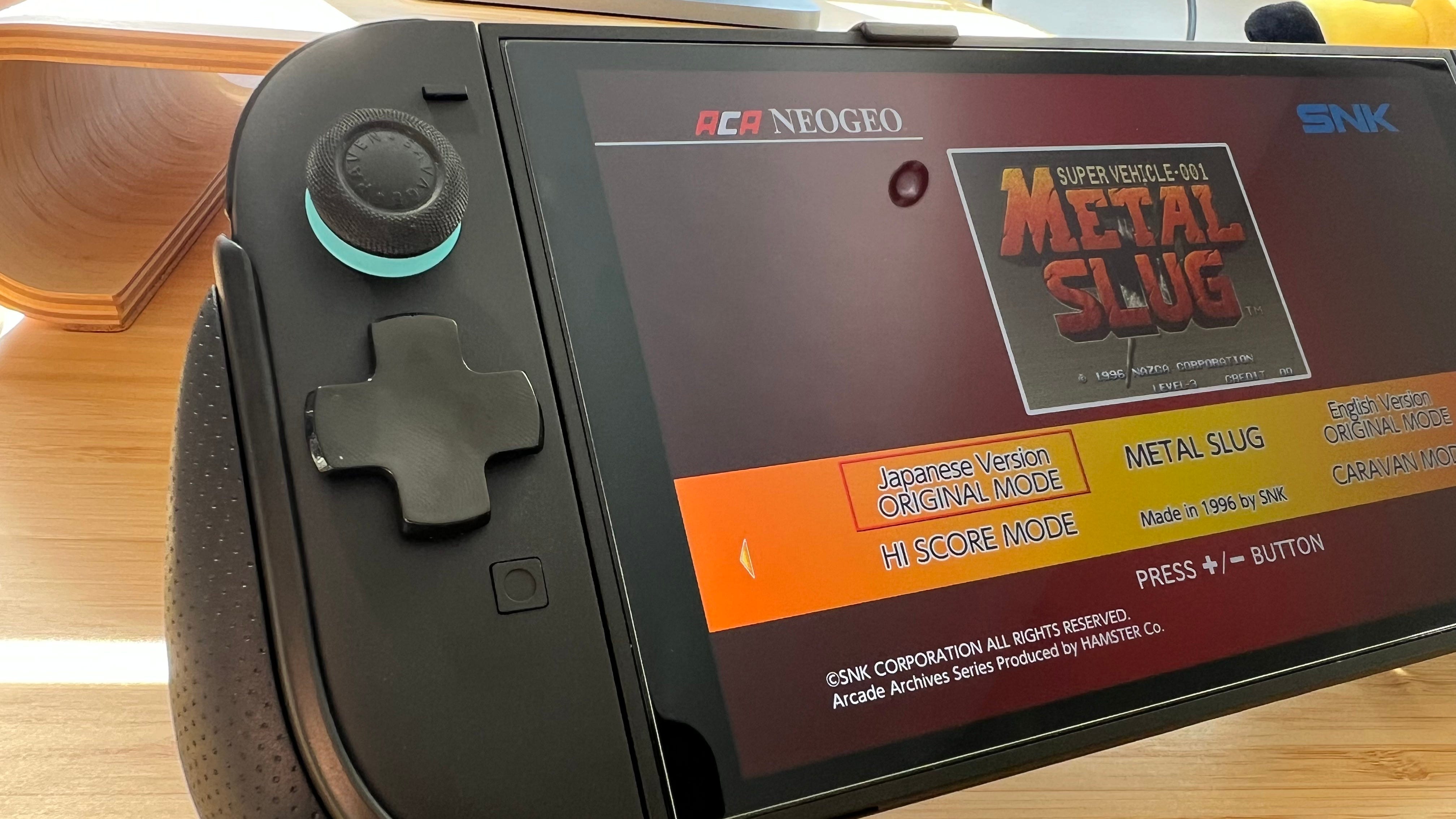

🥲 The Nintendo Switch 2 lacks a dedicated D-pad, a design choice made to facilitate local multiplayer
👍 However, a low-cost accessory, the Savage Raven by Skull & Co. D-Pad Button Cap Set, provides an effective solution
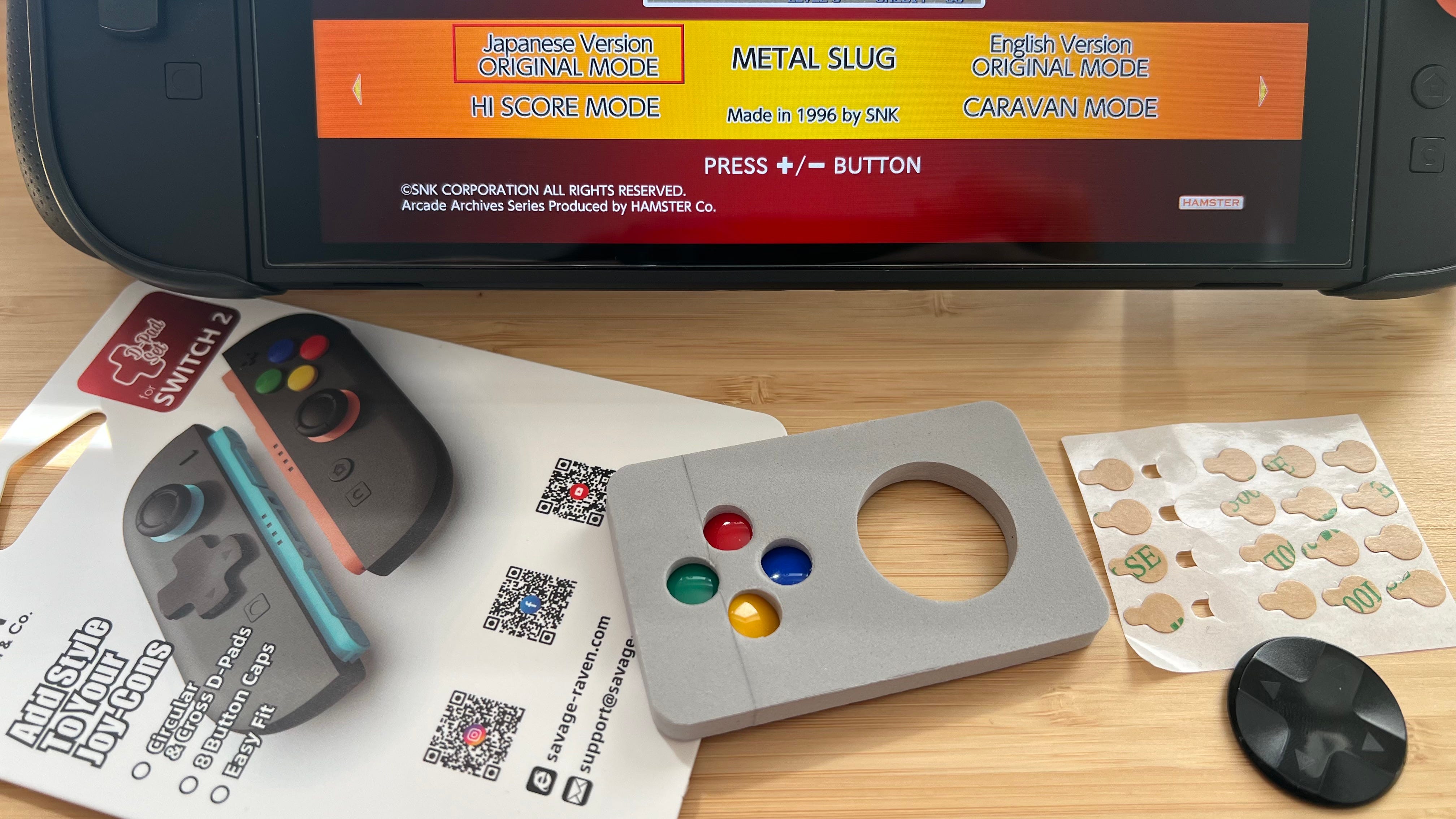
➕ The set includes circular and cross-shaped D-pads along with SNES-colored button caps
😍 This accessory enhances diagonal inputs and gameplay for side-scrolling and retro titles like Metal Slug and Tetris 99, though it doesn’t fully replace a Pro Controller’s D-pad
Even though I believe most of the Nintendo Switch 2 criticism online is rather overblown, there’s one aspect of Nintendo’s new console that left me disappointed as soon as it was revealed.
The lack of a dedicated D-pad.
Now, don’t get me wrong. I understand why Nintendo kept the same four-button “D-pad” for the Switch 2. This is still a console that lets you detach the controllers and hand one to a friend or family member for some local multiplayer. If Nintendo had stuck a D-pad on the left Joy-Con, that functionality wouldn’t work anymore.
However, I haven’t shared a pair of Joy-Con controllers with someone since 2017, and it’s something I’ll likely never do with the Switch 2.
Having a dedicated D-pad to play side-scrolling platformers, retro games, and to gain a greater level of control in games like Tetris 99 would have been a godsend, then. But alas, Nintendo thought differently. Perhaps we’ll get one with the future Nintendo Switch 2 Lite.
Let’s get savage
However, all is not lost. I’ve discovered a cheap and effective solution to the Switch 2’s missing D-pad problem – and it works so well that I’m more than happy to recommend it, even if there are a few caveats.
The accessory is called the Savage Raven by Skull & Co. D-Pad Button Cap Set for Nintendo Switch 2, and it doesn’t have the most glowing reviews on Amazon. But at $9.99, I thought it was worth a punt.
You get two types of D-pad as part of the package: a circular D-pad and a traditional cross-shaped D-pad – I prefer the cross-shaped one. You also get eight SNES-colored button caps if you want to customize your Switch 2 further, though personally I kept these off.
You get a bunch of stickers inside that you need to put on the left and right left Joy-Con 2 buttons (don’t put them on all four) and you’re also instructed to put a black pivot into the center of the D-pad.
Pro tip: don’t bother with the black pivot. I found the D-pad was far more responsive and kept its accuracy without the pivot, though feel free to experiment with both options. You also need to make sure the arrow on the back of the D-pad is pointing in the right direction before you stick it on.
A not-so-perfect solution
A few things to note. These D-pads, in my opinion, won’t transform the four buttons into a Nintendo Switch 2 Pro Controller-rivalling option. They do make diagonal inputs viable at last, but I don’t think you should buy them if you think they’ll suddenly allow you to perform hadoukens consistently in Street Fighter 6. They’ll definitely help, but remember this is still a Frankenstein-style solution.
However, for side-scrolling games, it works like a charm. I’ve been blasting through ACA NEOGEO Metal Slug and haven’t felt hampered at all by the controls. That wasn’t the case before, as playing Metal Slug with an analog stick just feels… weird.
I’ve also achieved numerous top 10 finishes in Tetris 99 – the ultimate acid test for any directional pad – with barely an accidental hard drop to mention. That’s an impressive feat for what is essentially a piece of plastic stuck over the existing four buttons.
For me, the Savage Raven by Skull & Co. D-Pad Button Cap Set for Nintendo Switch 2 has been worth every penny. I finally have a functioning D-pad on the Switch 2 and for $9.99, you could too.
Up next: Best Nintendo Switch 2 screen protectors: reduce glare and prevent scratches
Adam Vjestica is The Shortcut’s Senior Editor. Formerly TechRadar’s Gaming Hardware Editor, Adam has also worked at Nintendo of Europe as a Content Marketing Editor, where he helped launch the Nintendo Switch. He also runs a retro gaming YouTube channel called Game on, boy! Follow him on X @ItsMrProducts.