



🏆 Rating: 4/5
✅ Pros
🔋 The best battery life in a flip phone
📸 Upgraded main camera with better low-light performance
😍 Beautiful design that stands out in a crowd
⚙️ Very fast performance and charging
📱 All the same great flip-phone perks
❌ Cons
💰 $200 price hike isn’t justified well
📹 Video quality is still subpar
🧲 No Qi2 MagSafe support
🤖 The AI key is redundant
The Shortcut review

The second I picked up the Razr Ultra for 2026 at an event in Los Angeles, I knew what I was in for: a phone similar to the one Motorola made last year, but a little faster. The flip phone, which has stood out as one of the best on the market for the last 12 months, got a small refresh for this year with new colors, a new chip, and longer battery life. It also got a new price - $200 more than the previous version.
The Motorola Razr Ultra is still the best flip phone you can buy, even beating Samsung’s Galaxy Z Flip 7. But the price is hard to swallow; at $1,499.99, you’re paying for what’s essentially the same phone as last year, save for a couple of upgrades here and there. After spending time with the phone and getting to know it, those upgrades haven’t proven to be extraordinary or life-changing, just nice to have.
The Razr Ultra for 2026 is definitely better than the 2025 version, if only for the faster speeds and good looks. So long as you can get it at a discounted price, it’ll deliver the best flip phone experience you can get.
✍️ Review notes


😍 All about the glamour. Motorola continues to flex its design muscles with this year’s Razr family, and the Razr Ultra is a stunner in-person. My review unit is the Pantone Cocoa finish, which has a darker wooden design on the back than last year’s model and a richer, brown accent around the edges. Meanwhile, the flagship Pantone Orient Blue model is the real stunner, complete with a velvet royal blue hue that stands out like no other smartphone today. If you want a fashion-forward, statement-making smartphone, it’s hard to beat the Razr.
💪 Durable enough for everyday life. It’s also durable enough to withstand anything life throws at you. Between the added drop resistance, enhanced screen durability, and IP48 water and dust resistance rating, the Razr Ultra can handle more than you’d think. It’s also the first foldable to feature Corning Gorilla Glass Ceramic 3, which protects the cover screen from cracks and scratches. Sure, it’s technically more delicate than a normal phone because of the hinge, but companies have gotten good at ensuring durability doesn’t come at the expense of flexibility. Motorola’s at the top of its game in this regard.

📺 Big and spacious screens. The displays on the Razr Ultra remain top-notch, just like they were last year. The folding 7-inch AMOLED display remains as roomy as ever, and its slender aspect ratio means you can type with one hand, no problem. It has a 165Hz refresh rate and can reach a peak brightness of 5,000 nits, making it perfect for reading or watching videos in the bright sun. Motorola also kept the ever-so-spacious 4-inch AMOLED cover screen intact, complete with a 165Hz refresh rate and (almost) no bezels. You can swipe through widgets on it, open any app you want, use it as a viewfinder for the camera (more on that later), and it’s fully customizable. Samsung has been catching up with the Galaxy Z Flip’s cover screen, but there’s still no topping what Moto has pulled off.

📂 Still a crease, still limited flexibility. Motorola took steps last year to reduce the size of the crease in the middle of the screen. This year, the Razr Ultra maintains the same crease. That’s to say it’s noticeable, but likely won’t get in your way. What I’d like to see Moto do is switch to a different hinge mechanism for better flexibility; Samsung’s Galaxy Z Flip 7 can open at any angle you wish, whereas the Razr Ultra can only go so far before springing completely open or closed. It isn’t a huge deal, but for the amount of money you pay, I’d like some greater versatility in how wide I can open my phone.

📸 How are the cameras? Pretty good! Motorola upgraded the main camera with a new 50MP sensor that’s a solid step-up from last year, but the improvements tend to end there.


Main camera: The new 50MP main camera delivers beautiful pictures in bright daylight, with good color reproduction and sharpness. I like how Motorola is handling highlights and shadows as well, keeping them looking more natural than in years past. Nighttime photos have gotten the most noticeable boost, with better light capture and detail. Each picture comes out looking less processed than the ones I took with last year’s Razr Ultra, and compared to phones like the iPhone 17 Pro and Pixel 10 Pro XL, it managed to hold its own. This camera is surprisingly good for a foldable.
Ultra-wide: The ultra-wide camera remains unchanged from last year. It’s still a 50MP sensor with a 122-degree lens that can capture a lot of a scene in a single picture, but fails to look as good as it would if it were taken on the main camera. Lighting and contrast are two big issues for the sensor; unless it’s the perfect day outside, you’ll notice that details get lost in the shadows and highlights can get overblown. Colors also don’t look quite as natural, especially skin tones. It’s good enough for quick snaps, but nothing beyond that. Oh, and you can use it for macro photos if you want to get super close to stuff. Fun.
Selfies: I’m not a fan of how crunchy and overprocessed I look with the 50MP selfie camera on the Razr Ultra, but that’s ok. This is a foldable, so if you want to take great-looking selfies, you can do so with the rear camera. Fire up the camera by double-twisting your wrist while it’s closed, and you can snap pictures of you and your friends with either the main or ultra-wide cameras. The pictures will come out way better if you do this, trust me.
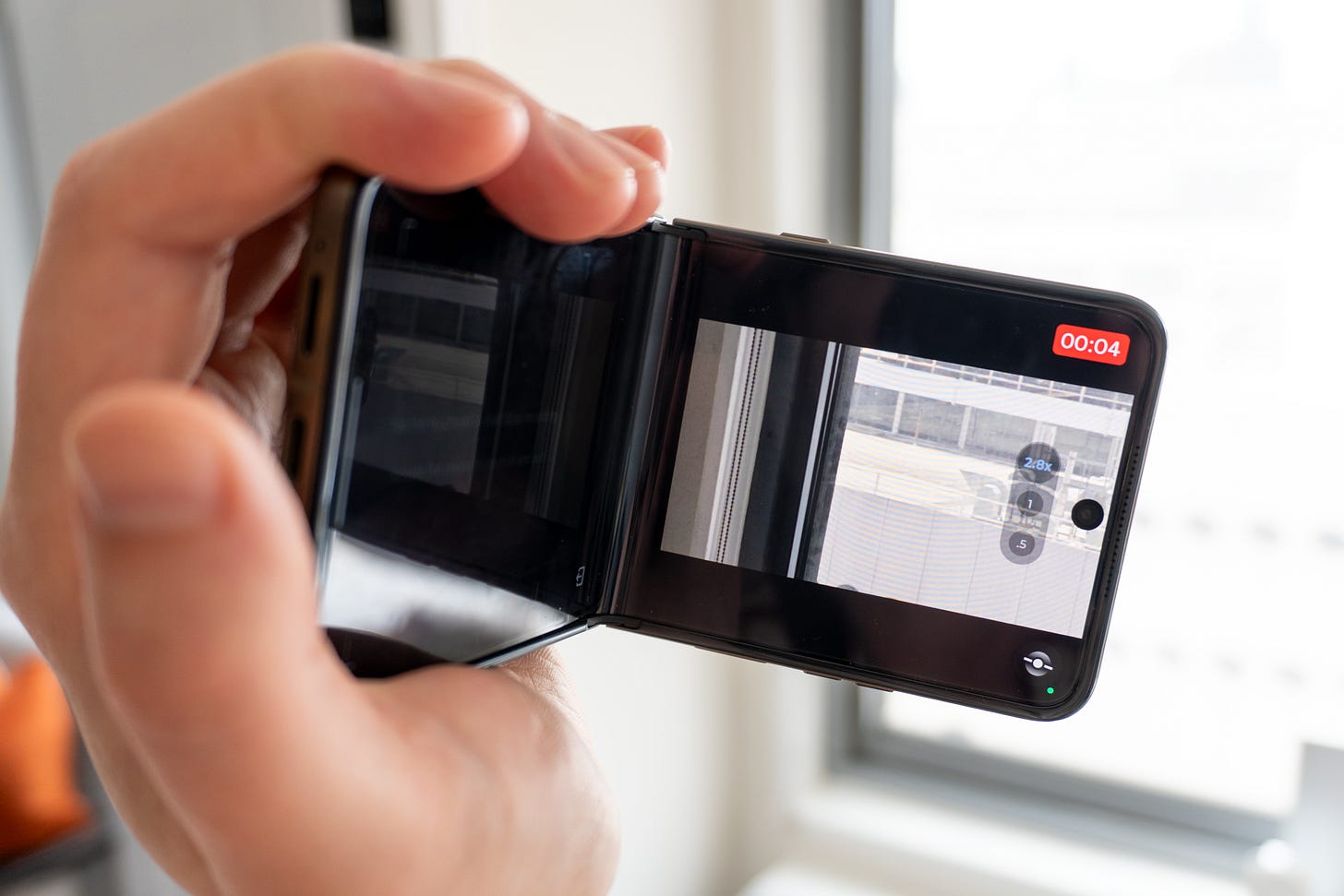
I enjoy playing around with the Razr Ultra’s new tilt-to-zoom feature in videos. (Credit: Max Buondonno / The Shortcut) Video quality: As is the case with many a Motorola phone, video quality is the weakest point of the Razr Ultra’s camera system. You can shoot in up to 8K 30fps and 4k 60fps, sure, and there are a ton of tools to help with keeping focus on subjects and stabilizing the frame. But the results are a different story. Each clip I record tends to look too processed to look natural, with less accurate colors and detail than what I can get with my iPhone or Pixel. And while the new sensor does help with picking up a bit more light at nighttime, it’s still not enough to make the Razr Ultra a good phone to buy if you prioritize video quality.
Neat tricks: Despite its downsides, the Razr Ultra’s camera system is one of the most fun thanks to its form factor. You can prop it up for hands-free group pictures, use the cover screen for selfies, and hold it open like a camcorder and record video. In fact, that last feature has been improved so that you can tilt the phone left or right to zoom in and out when shooting video, which is handy when you need to quickly zoom into something. You also get the Razr Fold’s Frame Match, which makes it easier for someone to take a picture of you and align the frame exactly to your liking. This experience is only possible with a flip phone like the Razr Ultra, which gives Moto a leg-up on the competition.


⚙️ Reliably fast performance. The Snapdragon 8 Elite inside the Moto Razr Ultra is super fast and efficient, as it was in last year’s Razr Ultra. Sure, it might seem lame to keep the same chip around for two generations of phones, but the 8 Elite has proven to be just that - elite. It’s paired with 16GB of RAM and 512GB of storage, so there’s plenty of room for your data and multitasking.

🤖 AI redunancy. Are people actually going to use the AI button on the side of the Razr Ultra? This is a question I asked myself when I reviewed the Razr Fold, which also has it. I never seem to reach for it, even though it sounds useful on paper. Press and hold to record a note or to remember what’s on your screen, double-press it to trigger Moto AI and ask for a summary of your notifications and anything you missed. It’s nice in theory, but I always forget it’s there, mostly because Moto AI never seems all that useful. I have Gemini access through a long-press of the power button… how much more AI do I need than that?

🔋 Best battery life in a flip phone. Motorola increased the battery size in the Razr Ultra from 4,700mAh to 5,000mAh, which is pretty surprising given the size of this phone. It was able to pull it off by using silicone-carbon batteries, the same found in the OnePlus 15 that allows for higher capacities without increasing the physical size of the battery itself. This helps give the Razr Ultra the best battery life you’ll find in a flip phone today. From browsing socials to editing Reels and taking lots of photos, the phone could last a full day for me before dipping to 40% by the end of it. That’s with heavier-than-normal usage, too. If you’re a lighter user, you could get nearly two days of battery life out of this guy, which is impressive. It’s much better battery life than we experienced on the Galaxy Z Flip 7, too, so those who need dependable endurance will want the Razr Ultra.
⚡️ Charging speeds are lightning fast. Just like last year, the Razr Ultra can recharge at up to 68W over USB-C, which juices the battery from zero to 50% in less than a half hour. Plus, you get 30W wireless charging and 5W reverse wireless charging, which is even more useful thanks to the phone's larger battery. I wish more companies would follow suit and upgrade their phones’ charging speeds to match the Razr Ultra’s. It’s 2026 - all phones should charge this fast.
🧲 No Qi2 MagSafe support. Unfortunately, the Razr Ultra still lags behind the competition in terms of convenient wireless charging. The performance is there, but where are the magnets? For yet another year, Motorola and many others have skipped out on proper Qi2 magnetic wireless charging, something only the Pixel 10 series offers in the United States (besides, y’know, the iPhone). It isn’t the biggest deal in the world to not have magnetic charging on a flip phone, but it’d be nice considering how much money you have to spend on it.


📱 Flip phone features are fun. The novelty of a foldable phone seems to barely fade the more you use it. The Razr Ultra gets all the perks of Razrs past like a tent mode for a standing clock, a tripod mode for hands-free photos, and the convenience of its small stature when it’s folded down. There’s something whimsical about being able to bend and flip the Razr Ultra that makes the experience more enjoyable than a traditional flagship, something that might appeal to you if you’re bored with your current phone.


📲 Android 16 with a little too much cruft. I generally like Motorola’s approach to Android since it rarely coats it in a thick and heavy skin, but the experience it’s been shipping lately has swayed in that direction a bit too far. The Razr Ultra is powered by Android 16 with a relatively lightweight skin across the system, but questionable choices like a newsfeed in the app drawer and stuttery animations make it feel a bit janky for $1,500. It’s still one of the better Android experiences on the market (backed up by seven years of updates, too), but there’s room for improvement.
Should you buy the Motorola Razr Ultra (2026)?

Yes, if…
✅ You want a flip phone with excellent battery life
✅ You want to open any app you want on the cover screen
✅ You want a phone that stands out like no other
✅ You plan to keep your next phone for 5-7 years
No, if…
❌ You want to save money (get the Galaxy Z Flip 7)
❌ Video quality is important to you (get the iPhone 17 Pro or Galaxy S26 Ultra)
❌ You need magnetic wireless charging (get the Pixel 10 Pro)
❌ You want a less expressive smartphone (get the Galaxy Z Flip 7)
Max Buondonno is an editor at The Shortcut and co-host of The Shortcut Live. He’s been reporting on the latest consumer technology since 2015, with his work featured on CNN Underscored, ZDNET, How-To Geek, XDA, TheStreet, and more. Follow him on X @LegendaryScoop and Instagram @LegendaryScoop.