



🏆 Review Score: 4.5/5 – ‘Awesome!‘
✅ Pros:
🪶 Super light without feeling cheap
💪 Packed with the best tech
👆 Excellent switches and side buttons
🛜 Multi-device compatibility
👏 The Keychron Launcher shames other brands
❌ Cons:
✋ Doesn’t work with every grip type
🤷♂️ Not the most exciting product
The Shortcut Review
Lightweight gaming mice have become increasingly popular, and the Keychron G3 shows how to design one that feels effortless to use without skimping on crucial features.
The Keychron G3 is armed with everything competitive gamers would expect from a high-end mouse: it has an 8K polling rate, a flagship PixArt 3950 sensor, DPI up to 30,000, and weighs just 44 grams. It feels robust in the hand, too, with no give or flex to the carbon fiber build.
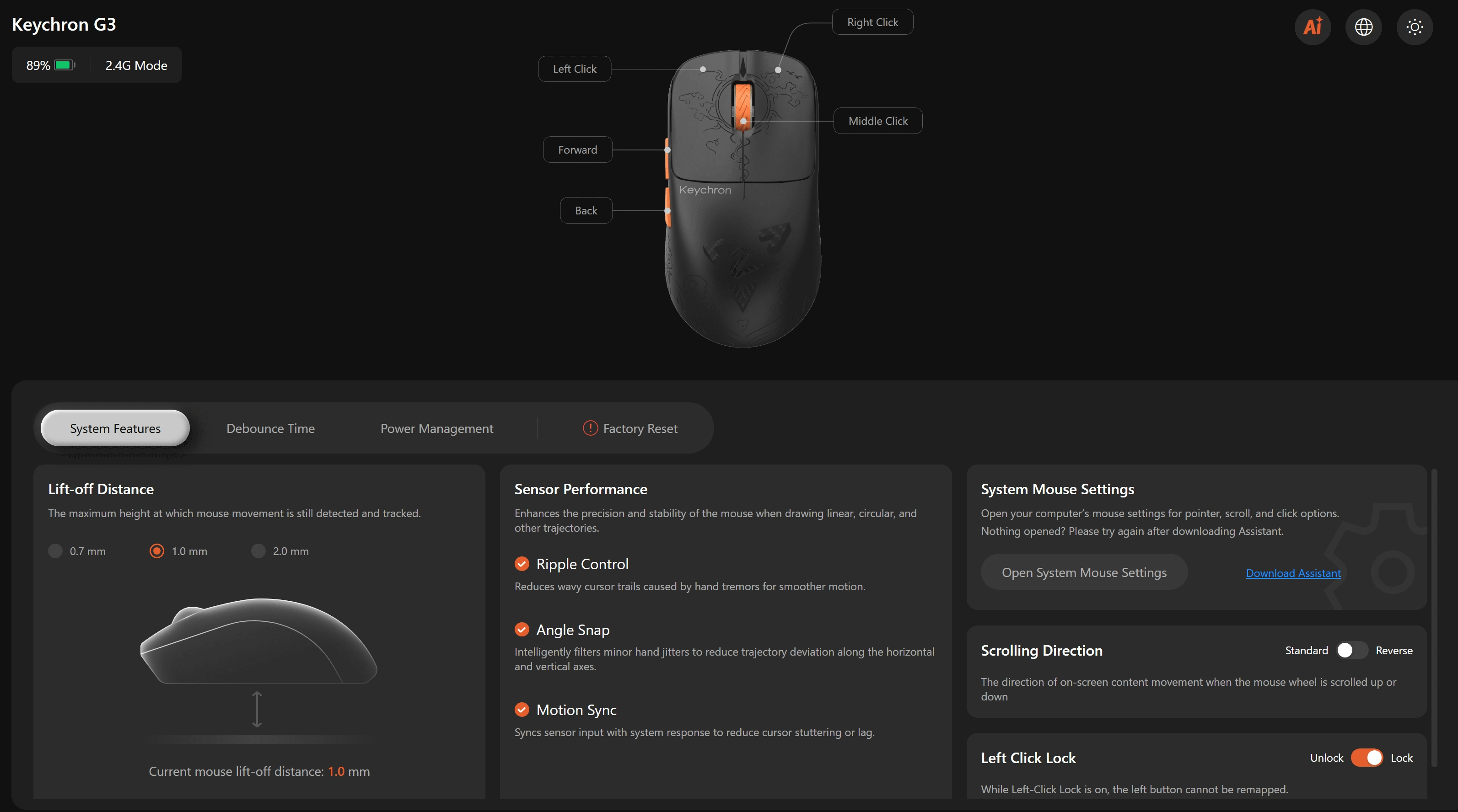
Thankfully, you can make any adjustments to the Keychron G3 without downloading proprietary software. The Keychron Launcher web app lets you create custom profiles, change the lift-off distance, power management, and a variety of other settings straight from your browser.

The 500 mAh battery lets you use the Keychron G3 for days before it needs charging, even when using an 8K Hz polling rate. You can also connect the mouse via Bluetooth or wired, giving you complete flexibility.
Keychron G3 specs 🛠️
Price: $109.99/$84.99
Connection: 2.4GHz, Bluetooth, Wired
Sensor: PixArt 3950 sensor
Battery Life: Up to 160 hours
Weight: 44 grams
Colors: Black (Carbon Fiber), Frosted Gray (PCB)
While it may not have fancy haptic induction technology like the Logitech G Pro X2 Superstrike, the Huano Micro Switches offer a satisfying click that isn’t distracting like on the Razer Viper V4 Pro.
At just 120mm long, 38mm tall, and 63mm wide, the Keychron G3 gaming mouse is best suited to those who play with a claw-grip or a fingertip-grip. Palm-grip players will probably struggle with the Keychron G3, as it’s slightly too short for larger hands, despite the raised hump. Still, I found it incredibly comfortable to use, even as someone who tends to use a palm-grip than a claw-grip.
At $109.99 for the Carbon Fiber model and $84.99 for the Frosted Gray model, the Keychron G3 undercuts most of the competition and delivers equally impressive performance in titles where it matters most, like Counter-Strike 2. Read my full Keychron G3 review below for more.
A review unit was provided by Keychron.
What I loved about the Keychron G3 ❤️

🪶 Super light without feeling cheap. No matter how hard you squeeze the Keychron G3, its shell never flexes or creaks. There are also no rattling parts or cheap-feeling materials. It may weigh just over 40 grams, but it still feels like a premium product thanks to its excellent build quality.
💪 Packed with the best tech. With an 8K polling rate, Motion Sync, and a PixArt 3950 sensor, the Keychron G3 doesn’t skimp on premium technology to achieve its lightweight design. You won’t be held back by input latency or let down by the G3’s beefy battery.
👆 Excellent switches, side buttons, and scroll wheel. Every button and switch on the Keychron G3 is a joy to press, and there’s a satisfying weight to each one. You also get a pleasant ‘click’ sound that isn’t distracting like on other mice. The rubberized scroll wheel is also a nice touch.
🛜 Multi-device compatibility. You can connect the Keychron G3 via its 2.4GHz wireless dongle, Bluetooth, or USB-C. The 2.4GHz dongle provides a rock-solid connection, and the option to connect via Bluetooth means you can use it on other devices with the flick of a switch.
👏 The Keychron Launcher shames other brands. You can change every setting and update the firmware of the Keychron G3 using the Keychron Launcher web app. There’s no need to download a specific piece of software that may eat up your computer’s resources and take up storage space. It’s a fantastic experience that other brands should follow.
What I disliked about the Keychron G3 💔

✋ Doesn’t work with every grip type. If you’re strictly a palm-grip player, the Keychron G3 is harder to recommend. The mouse is shorter than most, which means your fingers may extend slightly past the front.
🤷♂️ Not the most exciting product out there. Even though the Keychron G3 has an LED light in the scroll wheel, it only turns on when the battery is low or you first connect the mouse. It means it’s not the most eye-catching gaming mouse, and it doesn’t have any special tech like the Logitech G Pro X2 Superstrike's haptic inductive technology.
Should you buy the Keychron G3? 🤔

Yes, if…
✅ You want a super-light gaming mouse.
✅ You’re a claw-grip player.
✅ You want a mouse that works across multiple devices.
No, if…
❌ You don’t play many competitive PC games.
❌ You’re not a fan of lightweight mice.
❌ You’re a palm-grip player.
Adam Vjestica is The Shortcut’s Senior Editor. Formerly TechRadar’s Gaming Hardware Editor, Adam has also worked at Nintendo of Europe as a Content Marketing Editor, where he helped launch the Nintendo Switch. He also runs a retro gaming YouTube channel called Game on, boy! Follow him on X @ItsMrProducts.